Showing posts with label Me. Show all posts
Showing posts with label Me. Show all posts
Thursday, 27 December 2012
Some quick thoughts on Christmas
What I love about Christmas is the way that it has become a celebration of children and childhood, despite the rampaging commercialism and materialism that are slathered over it by the bucketload. This was first pointed out to me by an Israeli I met around 8 years ago, and every year I am reminded of it. In his words, "I love Christmas, it is like a celebration of childhood, I wish we had something like it at home".
I often think about this and how true this is if you just look at things from a slightly different angle, and if anything the biggest parts of childhood that are celebrated are trust and innocence.
What do I mean? Well even in these paranoid times it's OK for young children to go up to a total stranger and sit on their knee to talk to them at Christmas, and that it's OK for us to tell the children that said stranger will then come into their bedrooms late at night after breaking into the house to bring them sweets and gifts.
Can you imagine doing and saying those things at any other time of the year? Children going off to talk to a stranger is the stuff of most parents' nightmares (let alone their child trying to sit on a stranger!), and similarly, sneaking into childrens' bedrooms at night tends to be an unpopular choice of activity for adults. But at Christmas it's all OK, because the stranger in question will be bearing gifts and sweets for the children (provided that the children have been 'good')! Compare that the 'stranger danger' message that we give throughout the rest of the year.
Yes, this is the commercial side of Christmas, yes it's materialistic, but look at what underlies it.
Spending a Christmas with my young niece and nephew (5 and 7 respectively) showed me this "celebration of childhood" again this year, after all the unwrapping was done and the dinner was eaten all my niece wanted to do was wear a "princess dress". My nephew? All he wanted to do was go outside and kick a ball around, because he'd been promised he could do that every day while he was off school.

Tuesday, 22 May 2012
Thoughts on requirements!
Don't ask where this has come from, just accept that it has come ;-)
The key to good software engineering is good requirements management, and this must come from both sides.
Poor customer requirements (no matter how aggressively chased by the software provider) will always lead to "to-ing and fro-ing" and exasperation on both sides, no matter how good the provider is.
I know of software providers who have been described as "useless", by one customer (who as an organisation never really knew what they wanted, or had any ability to express their desires in good, unambiguous requirements) and "excellent", by another customer (who had a very clearly documented set of requirements that had been fully agreed internally before issue)!
The image at the top of this Building Better Software blog summarizes the situation in some case quite well. It's easy to laugh at this image, but it's a real issue that people (who sometimes should know much better) sometimes really don't know what they need (they all know what they want!).
For example, I know of a project that required data from vehicles captured at 5 second intervals. No problem, easy in fact with the proliferation of CAN bus. But the vehicles were electric and the customer wanted to analyse how much energy was being recovered through regenerative braking, and basic application of the Nyquist Shannon theorem says that with a 5 second sample time only events of 10 seconds or greater duration could be reliably captured. So guess what? Next to no regenerative braking events were captured and the customer started trying to tell the vehicle manufacturer that the vehicles were faulty as they weren't performing regenerative braking as advertised. All because the customer didn't tell the software provider what they wanted to do with the data, just that they wanted data collected at a certain interval (the customer then went back to the software provider and requested free changes since it was "obvious" what they wanted to do with the data... but that's another story!).
Of course feature-creep is also a problem - adding kludges in an attempt to "make a tweak" to keep a customer happy will only lead to borked systems. Customers need to be quoted, and need to expect to have to pay if they want changes or increases to a system's capability so that the work can be correctly undertaken.
Finally, competing documentation "standards" can make things worse. From diagrammatic through to natural language (sometimes including metaphor and simile) lots of people have differing ideas on what makes "good requirements", and the gamut runs from UML, SysML, SDL through to RFC2119-based prose and "user stories". In fact this XKCD applies quite nicely.
Friday, 13 April 2012
Booting up
Edited: 20120413 to add images and fix some errors.
OK, so today was fun, I received my Olimexino-STM32 that I talked about yesterday and I was able to do a few things with it:
This last bit was quite tricky and not all that obvious! So a description follows for anyone out there trying to work out how to make this work... especially as most of the instructions I could find are Linux-based, so I made sure I could do this using the Eclipse IDE on my windows machines too!
Note that all of this assumes that you've already set up Eclipse, the various drivers and other software required and have a JTAG interface to hand!
Firstly you need to make sure that you have copied the OpenOCD files and the Olimex examples into a folder structure that mimics that found under your 'Program Files' folder, and make this your workspace (short paths with no spaces are better, mmm-kay?):

Next, go download the Maple bootloader source and unzip it. Move the folder named something like 'leaflabs-maple-bootloader-d1234348' (yours will have a different name) into your workspace folder and rename it to something a little shorter, I called mine, 'stdBoot' (you can see this in the image above).
In Eclipse right-click in the projects pane and select 'Import', click on 'C/C++' and then select 'Existing Code as Makefile Project' and click 'Next':


For the 'existing code location' browse to the 'stdBoot' (or whatever you called it) folder, and select just this folder:

Click on 'Finish'. The folder and contents should then appear in the projects pane. 'Borrow' (copy and paste) the stm32.cfg andopenocd.cfg project.cfg files from one of the other STM32 projects for your 'stdBoot' folder:

OK, almost there! If you've not done so already then hook up your board to your computer via the JTAG. You also need to power the board - to do this I use a USB lead that is broken and supplies only power (otherwise the PC will try to load the USB drivers that the JTAG needs and reserve them!).
Try clicking the 'Run external tool' entry in Eclipse that matches your JTAG interface (for me this is the ARM-USB-TINY-H), if you get an error like this:

Then just click in the pane holding 'main.c' and try again, what you should see is this:

Which appears in the console panel end finishes something like: "stm32.cpu: hardware has 6 breakpoints, 4 watchpoints". This is good and means that everything is running,
Ensuring that you're in the C/C++ perspective of Eclipse, expand your 'stdBoot' project and open the 'Makefile' - on my PC the make action failed to make some folders, so look through for 'mkdir' commands and create the folders that make will require. Unless you know exactly what you are doing, DO NOT EDIT THE MAKEFILE! In my Makefile, the mkdir commands are:


Now right click on the 'stdBoot' project and select'Build as...' 'Make Targets'/'Build', in the dialog that appears, click on 'Add', then in the top text entry box type 'all' (without the ''), then click 'OK':

Now select the 'all' entry in the 'Make Targets' window and click on 'Build'.
If your setup is OK then you'll see a successful build occur. Warnings are undesirable, but survivable - 'Errors' though are a big problem! Check the console carefully - if you've had a successful build then you will receive a report of the file sizes created. If you see errors, then Google is your friend! A good outcome looks like this (just cancel any errors from 'mkdir.exe' as we've already circumvented these):
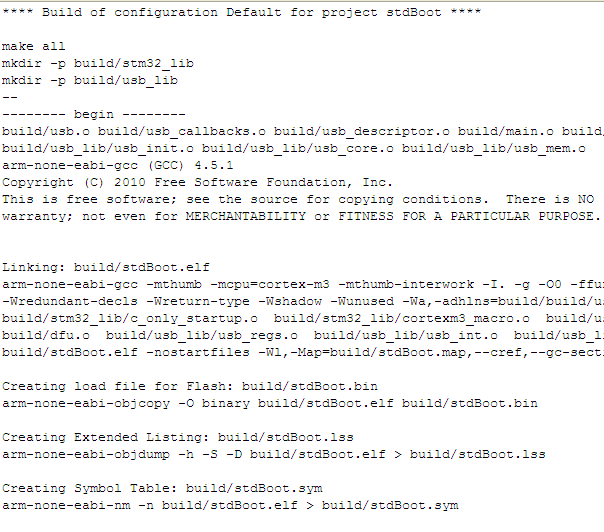

Now, right-click your project and under 'Debug as...' select the 'Debug configuration' option. In the new window select 'Zylin Embedded Debug (Native)' and click the 'New launch configuration icon' button:

Fill out the Debug configuration name and there are now some tabs to fill out:


target remote localhost:3333
monitor gdb_breakpoint_override hard
monitor soft_reset_halt
symbol-file build/stdBoot.bin
break main
target remote localhost:3333
monitor reset halt
monitor wait_halt
monitor sleep 100
monitor poll
monitor flash probe 0
monitor flash write_image erase main.bin 0x08000000
I know this is quite long, soif I can I'll add some explanatory images I hope the images are useful!
- Set it up so that I could use it with the Maple integrated development environment ('IDE') - a simple IDE that allows a 'fast-start' and that comes with quite a few 'example' programmes to show the capability of the device, and also provide a basis for one's own projects.
- Programmed it to make some LEDs flash on and off in different sequences
- Set it up so that I could use it with the Eclipse IDE - a much more powerful IDE that provides more flexibility (at the cost of more risk of doing something that can't be easily undone)
- Programmed it again using Eclipse to make the LEDs flash on and off, using a JTAG interface
- Worked out how to return the board to being able to work with the Maple IDE (since using the Eclipse IDE to download code removed the bootloader that the Maple tool requires)
This last bit was quite tricky and not all that obvious! So a description follows for anyone out there trying to work out how to make this work... especially as most of the instructions I could find are Linux-based, so I made sure I could do this using the Eclipse IDE on my windows machines too!
Note that all of this assumes that you've already set up Eclipse, the various drivers and other software required and have a JTAG interface to hand!
Firstly you need to make sure that you have copied the OpenOCD files and the Olimex examples into a folder structure that mimics that found under your 'Program Files' folder, and make this your workspace (short paths with no spaces are better, mmm-kay?):
Next, go download the Maple bootloader source and unzip it. Move the folder named something like 'leaflabs-maple-bootloader-d1234348' (yours will have a different name) into your workspace folder and rename it to something a little shorter, I called mine, 'stdBoot' (you can see this in the image above).
In Eclipse right-click in the projects pane and select 'Import', click on 'C/C++' and then select 'Existing Code as Makefile Project' and click 'Next':
For the 'existing code location' browse to the 'stdBoot' (or whatever you called it) folder, and select just this folder:
Click on 'Finish'. The folder and contents should then appear in the projects pane. 'Borrow' (copy and paste) the stm32.cfg and
OK, almost there! If you've not done so already then hook up your board to your computer via the JTAG. You also need to power the board - to do this I use a USB lead that is broken and supplies only power (otherwise the PC will try to load the USB drivers that the JTAG needs and reserve them!).
Try clicking the 'Run external tool' entry in Eclipse that matches your JTAG interface (for me this is the ARM-USB-TINY-H), if you get an error like this:
Then just click in the pane holding 'main.c' and try again, what you should see is this:
Which appears in the console panel end finishes something like: "stm32.cpu: hardware has 6 breakpoints, 4 watchpoints". This is good and means that everything is running,
Ensuring that you're in the C/C++ perspective of Eclipse, expand your 'stdBoot' project and open the 'Makefile' - on my PC the make action failed to make some folders, so look through for 'mkdir' commands and create the folders that make will require. Unless you know exactly what you are doing, DO NOT EDIT THE MAKEFILE! In my Makefile, the mkdir commands are:
Now right click on the 'stdBoot' project and select
Now select the 'all' entry in the 'Make Targets' window and click on 'Build'.
If your setup is OK then you'll see a successful build occur. Warnings are undesirable, but survivable - 'Errors' though are a big problem! Check the console carefully - if you've had a successful build then you will receive a report of the file sizes created. If you see errors, then Google is your friend! A good outcome looks like this (just cancel any errors from 'mkdir.exe' as we've already circumvented these):

Fill out the Debug configuration name and there are now some tabs to fill out:
- On the first tab, 'Main', in the C/C++ application box type: build/stdBoot.bin
- On the second tab, 'Debugger', in the 'GDB debugger' box type: arm-none-eabi-gdb (if you've not added the yagarto/bin folder to your path then browse to that file)

- On the third tab, in the 'Run' commands type:
target remote localhost:3333
monitor reset halt
monitor wait_halt
monitor sleep 100
monitor poll
monitor flash probe 0
monitor flash write_image erase main.bin 0x08000000
- On the 4th and 5th tabs do nothing (you can 'add to favourites' on the 6th tab if you want to)
I know this is quite long, so
Friday, 17 June 2011
Ohai2u!
Hello there!
So here we are... I have no idea where this is going to go, or how it will get there, but it should be interesting to find out.
I suppose the first thing I should tell you is a few things about me, for those too lazy to read my account; I live in Warwick in the UK and I am in the middle of a few things, I'll probably write about them now and then:
So here we are... I have no idea where this is going to go, or how it will get there, but it should be interesting to find out.
I suppose the first thing I should tell you is a few things about me, for those too lazy to read my account; I live in Warwick in the UK and I am in the middle of a few things, I'll probably write about them now and then:
- A part-time MSc in Control Engineering. This came about after an argument with a (now ex) girlfriend where we split up for a while, I decided that I would need something to do, and decided, for want of a better expression, to "improve myself" in a way that might make me more useful at work (q.v.). At the time of writing I have about 9 months left to go (which will be taken up with my project, this will involve some Matlab and the report for which will have to be written in LaTeX).
- Teaching myself to play the guitar (this has been going on for about 6 years), one day I expect I'll get around to paying someone for a lesson.
- Relearning to play the cornet (I first learnt at school, a few years ago now).
- Running a photography business.
- Sitting on the board of a high technology company that is in the field of electric vehicle design and engineering. Primarily I'm responsible for all electrical and electronic systems activities, but I also have some input into other areas, such as customer service and information systems.
Something I'm planning to add to the above is that I want to work through, "The Elements of Computing Systems: Building a Modern Computer from First Principles" by Noam Nisan and Shimon Schocken, which is freely available at: http://www1.idc.ac.il/tecs/ so feel free to join in if you'd like to.
Subscribe to:
Posts (Atom)